My selfhosting adventure
Ah, self-hosting. That magical realm where dreams of digital independence and server supremacy collide with the cold, hard reality of broken packages and obscure compatibility issues. My journey into this brave new world began innocently enough: I was just a curious tech enthusiast, armed with nothing but an idea and a Raspberry Pi (RPI). Little did I know, I was about to embark on an adventure so filled with trials and tribulations that even Indiana Jones would have thrown in the towel.
The RPI Reckoning
I started my self-hosting saga with a Raspberry Pi, that adorable little board that promises the world but delivers... well, let’s just say it’s a mixed bag. I thought, “This will be perfect for hosting my own services!” But it wasn’t long before I realized the cold, hard truth: ARM is shit.
Compatibility issues began to rear their ugly heads like bad internet memes. "Oh, you want to run that application? Ha! Not on my watch!" I felt like I was trying to play chess with a pigeon; it would just knock over all the pieces, poop on the board, and strut around like it won. After a few weeks of wrestling with dependencies that refused to cooperate, I decided to ditch the Pi and venture into the world of serious hardware. But at least is useful for adding .mkv capabilities to an old tv.
The Quest for the Supercomputer
Fueled by my newfound frustrations, I set my sights on a grander vision: building a supercomputer for LLM (Large Language Model) inference. I imagined myself as the next great AI overlord, churning out responses so witty and insightful that even ChatGPT would weep with envy. But alas, GPUs are expensive!
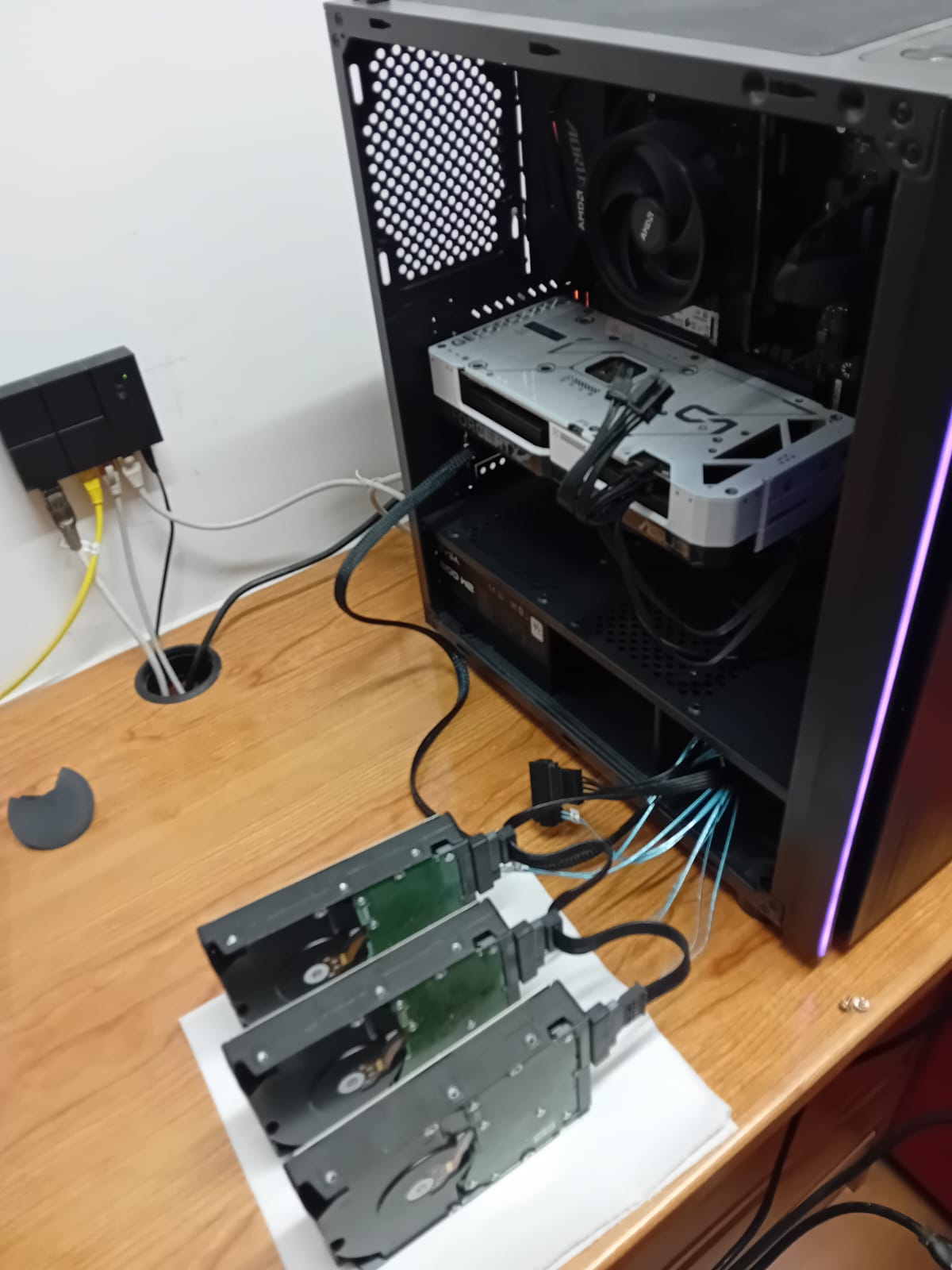
I wandered through the depths of online marketplaces, trying to find a deal that wouldn’t leave my wallet gasping for air. I finally stumbled upon a promising setup: 80% of the budget for a somewhat powerful GPU, and the rest in to a somewhat capable ryzen processor and loads of ram. I bought everything without checking if they were compatible, of course. Why do research when you can dive headfirst into chaos?
After what felt like weeks of assembling the beast, I powered it on, my heart racing with anticipation. It worked! I had my own LLM inference server! I didn’t even need ChatGPT why would I? I was now the proud owner of an AI system that was technically a few generations behind but hey, it was mine!
The Great Server Catastrophe
Just as I was basking in the glory of my newfound power, disaster struck. I decided it was time for a routine update. Surely, nothing could go wrong with a simple apt update, right? Spoiler alert: I was wrong.
As I entered the command, I felt a chill run down my spine. The server started to churn ominously, and I braced myself for the worst. Within moments, my beloved Proxmox server had transformed into an overcooked potato. The disappeared from the pcie logs, and I could almost hear the ghostly laughter of other self-hosters echoing in the background.
I had officially blown up my server. In my hubris, I had unleashed the dark forces of dependency hell, and there was no going back. I spent hours searching online forums, desperately trying to find a way to restore my server, only to discover that I was not alone in this tragedy. Apparently, countless others had fallen victim to the same apt update curse. I felt a strange camaraderie with them; we were now part of an exclusive club of self-hosting failures.
Turns out that you cannot run ``apt update`` on a proxmox instance, you should run ``apt dist-upgrade``, That’s what happens when you don’t listen to the ARCH linux fanboys (Just read the wiki)
Backups and Enterprise SAS Disks
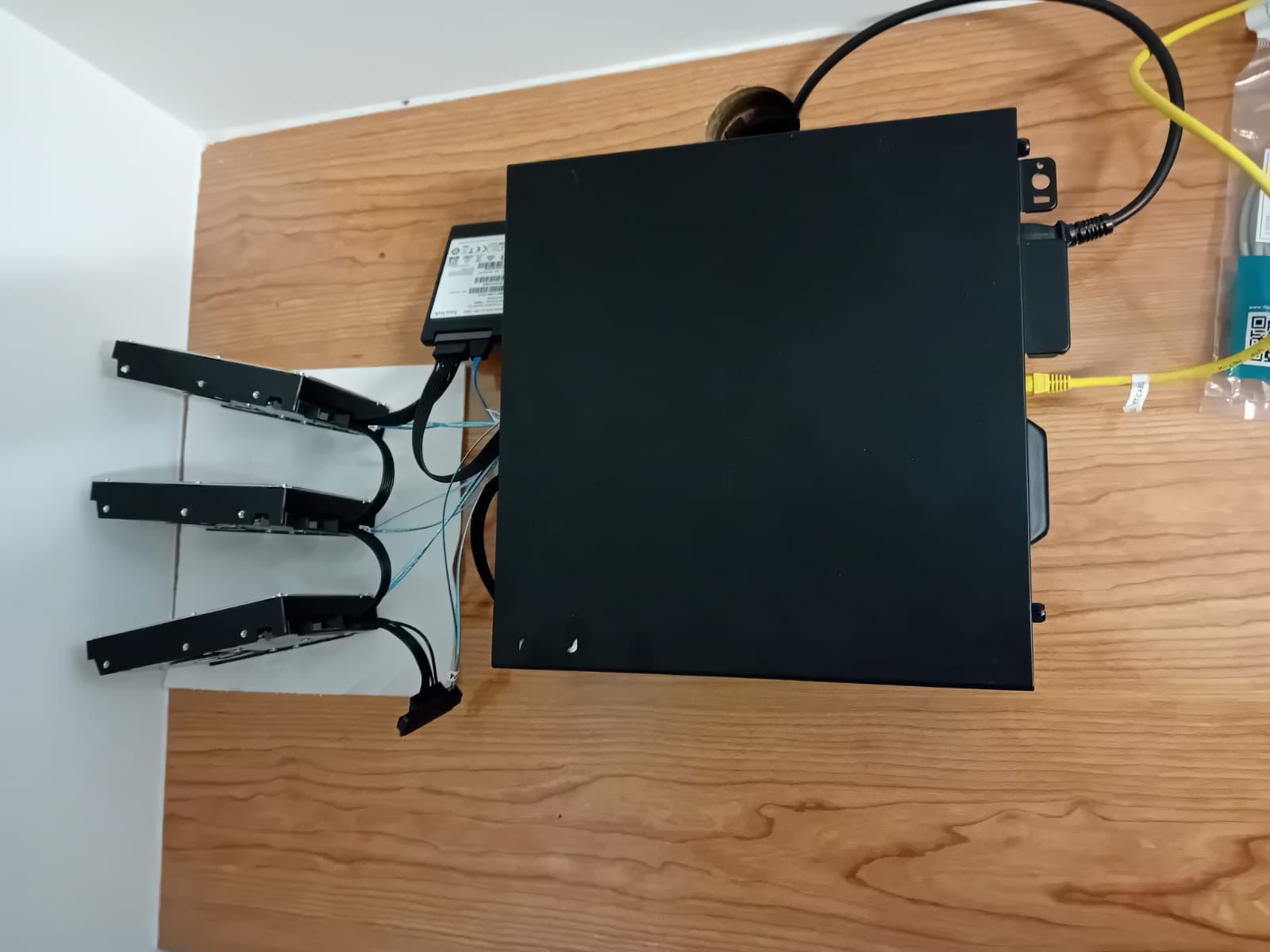
After the server explosion, I realized I needed a backup plan. So, I set out to build a backup server, a fortress of solitude that would protect my precious data from the chaos I had so clearly invited into my life. Armed with a myriad of enterprise SAS disks, I plunged into another round of hardware shopping. It turns up that they are pretty cheap, but now without its downsides.
Now, let me tell you, enterprise SAS disks are a breed of their own. These disks are not just hard drives; they are like the bouncers of the data world. They require a specific configuration, special controllers, and a level of expertise that I decidedly did not possess. As I struggled to connect the disks, I felt like I was trying to decipher ancient hieroglyphics. The disks demanded attention, and I was their unwilling servant.
Every time I thought I had everything hooked up correctly, I’d get a lovely error message that seemed to mock me. “Oh, you thought you could just plug these in and make it work? Adorable!” I wrestled with drivers and configurations until I was so delirious I started naming the disks. “This one is Bob, and that one is Sarah. Together, they shall rule my backup empire!” I may have lost my mind, but at least I was having fun!
The Aftermath
Finally, after what felt like an eternity, I managed to get my backup server up and running. It was a patchwork of hard drives, cables, and pure determination. And you know what? It felt good! I had learned so much, even if I had also learned that sometimes, the universe just doesn’t want you to succeed.
I still have my "supercomputer", and while I haven’t become the next great AI overlord yet, I have a newfound appreciation for the little things like not blowing up my servers. Now, I can run my own LLM inference without the fear of spontaneous combustion, and I’ve learned to fear the apt update like a cat fears a vacuum cleaner.
So here I am, a self-hosting enthusiast with a quirky tale of trials and tribulations. I still may not be a tech guru, but I have a story to tell one filled with laughter, tears, and a few too many blown servers. And hey, at least I can still tell the world about my adventures. Because if there’s one thing I’ve learned, it’s that self-hosting might be a chaotic journey, but it’s a journey worth taking at least until the next apt update.
What I currently selfhost
Tailscale: The Magical VPN
Imagine a magical VPN that makes all your devices feel like best friends that could use the power of friendship to be together even if a double NAT is in their path. That’s Tailscale for you! It creates a secure mesh network that allows my devices to communicate with each other, no matter where they are in the world. Need to access your home network while sipping a latte at your favorite café? Tailscale’s got your back! It’s like having a secret portal to your digital fortress, making it easier to access my self-hosted services without dealing with the complexity of traditional VPN setups. Who knew networking could feel like a fun game of hide-and-seek?
Network Boot: Goodbye, USB!
Ah, the days of fumbling with USB drives and endlessly rebooting. Enter network booting the magical ability to boot new PCs directly from the network! No more USB gymnastics or praying that your flash drive isn’t corrupted. This service has transformed my life into a smooth, streamlined experience. I can set up new machines with ease, and it feels like I’m playing tech wizard, conjuring new devices out of thin air. Just imagine: a world where you don’t have to worry about finding a working USB stick or hunting down the latest Linux ISO. Network booting has freed me from those mundane shackles! Just don’t ask me how many times I have really use it (✿◠‿◠)
My NAS: The Digital Treasure Chest
Every self-hosting journey needs a treasure chest, and mine is my Network Attached Storage (NAS). This glorious piece of hardware serves as my personal cloud, where I can store all my files, music, movies, and Linux ISOs without breaking a sweat. It’s like having a digital attic filled with everything I could ever need except it doesn’t smell like mothballs. I can access my files from anywhere, and the best part? I can share my collection of cat videos and obscure indie songs with friends, making me the coolest (or weirdest) person in my social circle
Jellyfin: The Multimedia Maestro
Welcome to the world of Jellyfin, my trusty media server! Jellyfin is like a personal librarian for my media collection, expertly managing my music, movies, and even my Linux ISOs. It’s open-source, which makes it the perfect alternative to those subscription-based services that always seem to go up in price. With Jellyfin, I can stream my favorite tunes while also diving into the depths of my selfhosting obsession. Picture this: a night of grooving to sweet jams while simultaneously prepping for my next Linux installation now that’s multitasking!
Vaultwarden: The Fortress of Passwords
Enter Vaultwarden, the ultimate password management fortress. It’s like having a digital bodyguard that keeps my passwords safe from the lurking dangers of the internet. Gone are the days of using “password123” for everything! Vaultwarden encrypts my data and allows me to store all my passwords in one secure location, making it easy to log in to my various accounts. And let’s be real, with the number of services we all use these days, who could keep track of that many passwords without losing their sanity? Vaultwarden is my knight in shining armor, protecting my digital life one password at a time.
Custom Finance and Expense Tracker: The Budgeting Wizard
Now, budgeting can feel as tedious as watching paint dry, but not anymore! With my custom finance and expense tracker, I’ve turned financial management into an adventure. This tool allows me to track my expenses and visualize my budget in a way that makes me feel like a savvy financial wizard. No more scribbled notes on napkins or chaotic spreadsheets! My tracker is functional as it is made of the finest spaghet I used to code (I don’t code spaghetti anymore. Pinky promise! ) , helping me identify my spending habits while simultaneously allowing me to plan for that next big tech purchase. Because let’s face it, who wouldn’t want to budget for the latest GPU?
Audiobookshelf
Ah, AudiobookShelf; it’s like having a personal library that follows me around! I can listen to audiobooks while I’m doing everything. Cooking dinner? Audiobook. Folding laundry? Audiobook. Trying to figure out what went wrong with my Wi-Fi? You guessed it Audiobook! And if I’m ever feeling extra lazy, I have this AI tool that converts all my eBooks into audiobooks. It's like magic, but smarter! No more switching between formats or feeling guilty for not reading with my eyes now, I can have my cake and eat it too, all while getting smarter and more productive. Multitasking, here I come!
Lots of AI Tools: My Digital Playground
As a self-proclaimed AI enthusiast, I’ve filled my server with lots of AI tools. Whether it’s for generating text, creating images, or automating tasks, I’m always experimenting with the latest technologies. Each tool brings its own unique flair to my digital playground, allowing me to unleash my creativity and productivity. Want to create a parody song or generate some quirky memes? I’ve got an AI for that! It’s like having an army of little digital minions at my fingertips, each ready to serve my wildest tech dreams.
Remote Desktops: Surprisingly Useful
Ah, the humble remote desktop but wait! It’s not just any service; it’s my multitasking superpower! Imagine having the ability to flip between different operating systems and applications like a seasoned chef juggling knives. With remote desktops, I can access various systems without the pesky dependencies or compatibility issues.
Need to check on a Linux box while running Windows apps, all from the comfort of my couch? Easy peasy! Want to run an application on MacOS just to feel fancy? Done! It’s like having my own personal cloud of operating systems, ready to be summoned at a moment's notice. I can seamlessly juggle tasks, all while avoiding the chaos of managing multiple physical machines. No more fussing with hardware or dealing with compatibility nightmares just pure, unadulterated multitasking bliss!
Gitea: My Private GitHub
Now let’s talk about Gitea, my private GitHub. It’s like having my own personal version control system, where I can store all my code without worrying about the prying eyes of the internet. Gitea allows me to collaborate on projects with friends while keeping everything cozy and private. It’s the warm, fuzzy blanket of version control no corporate overlords or pesky ads, just me and my code, living happily ever after.
A VPS!?!
Yes I will admit it, I am not a real selfhoster (⓿_⓿), I Use a VPS for public facing stuff
Kitty: My (Hidden love) Platform
Ah, Kitty! This is my beloved platform that functions like GitHub but is tailor made for the biotech world. It’s where I store and collaborate on all things biotech-related, from research projects to data analysis scripts. Kitty makes it easy to manage version control and share my findings with fellow bio-nerds without the corporate drama.
Hey you like it, well is false, you should read its true story here.
The Page You Are Reading: My Personal Portfolio
And finally, here we arrive at the page you’re currently reading my personal portfolio website! This digital showcase is where I display my self-hosting adventures, tech projects, and occasional bouts of insanity. It’s like my online resume but with a dash of flair and a sprinkle of humor. Here, I can share my thoughts, document my journey through the tech landscape, and hopefully bring a smile or a chuckle to anyone who stumbles upon it. Think of it as my virtual stage, where I’m not just presenting my skills, but also sharing my passion for technology and self-hosting. It’s a place where creativity meets tech wizardry, and who knows, maybe it’ll inspire someone else to embark on their own self-hosting adventure!
Galaxy: The Biotech Behemoth
Ah, Galaxy the biotech platform that I once self-hosted out of sheer necessity. You see, we needed it for class, and those public servers? Let's just say they were slower than a snail on vacation! I thought, “Why not bring the power of Galaxy into my tech fortress?” So, I dove into the wild world of hosting it myself.
However, I quickly learned that this beast is super RAM hungry; it needs at least 8 GB just to keep from crashing ansible at the command line. That’s around $50 a month on hosting! It felt like hosting a tech conference inside my home an exhilarating whirlwind of processes, installations, and the occasional existential crisis. But then reality struck: VPS providers have insane RAM prices! As my costs skyrocketed faster than my server could process data, I had to make the tough decision to let Galaxy go. It was a wild ride, but sometimes you have to prioritize your sanity and your wallet!